 |
Registration Guide
Home > How to use tips > Registration Guide
The AssistantTools.com software is try-before-buy software and you must register the software during 30-days trial period or deinstall the software after ending of trial period.
Please follow this guide if you already purchase our software and have registration key. Please read 'Purchase Guide' if you have not a registration key.
You have a registration key (want to register a program):
-
You should get your registration key on your email address specified at registration of a program.
 You will get the message with the confirmation of your registration and with the registration key not later than in 48 hours. These 48 hours do not include holidays and weekends. If you do not get this message within this period, contact us using this online form and we will take measures to solve the possible problem. Please check up a SPAM folder of your email client before this. You will get the message with the confirmation of your registration and with the registration key not later than in 48 hours. These 48 hours do not include holidays and weekends. If you do not get this message within this period, contact us using this online form and we will take measures to solve the possible problem. Please check up a SPAM folder of your email client before this.
- Right-click on this message text (on your email client) and select the 'Select All' command on the context menu that appears. Now right-click on this message text again and select the 'Copy' command.
-
Run a program and click the 'Enter key' button on Reminder window (see Figure 1) or Trial expired window (see Figure 2).
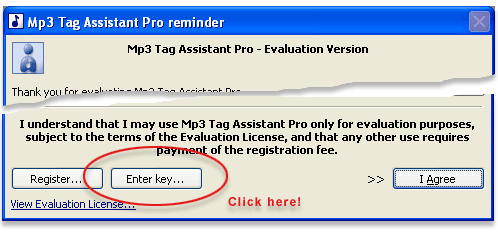 Figure 1. Reminder window Figure 1. Reminder window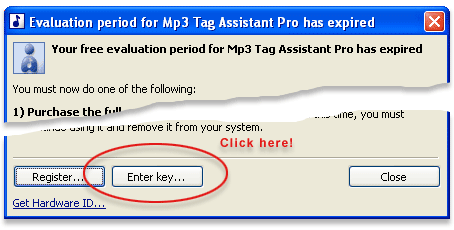 Figure 2. Trial expired window Figure 2. Trial expired window
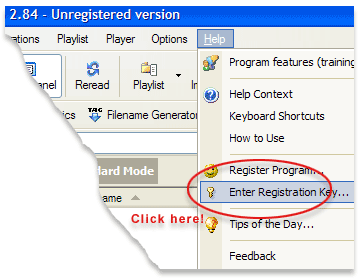 Figure 3. Type your registration key using menu Figure 3. Type your registration key using menu
-
Click 'Paste' button (see Figure 4) on 'Enter registration key' window and then click 'OK' to complete registration.
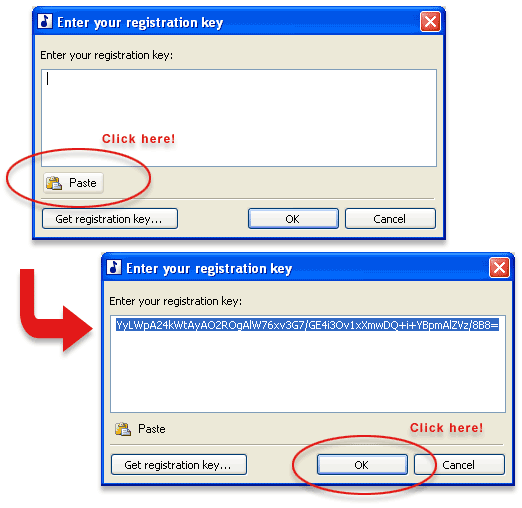 Figure 4. Register software Figure 4. Register software
-
You will have a program without limitations after restarting a program! Thank you for purchase!
If after restarting you will have a program with limitations please contact us using this online form and we will take measures to solve the possible problem.
See also
© March 16, 2007 by AssistantTools.com. All rights reserved.
|
|
|
|
 |
How to Use |
 |
| | |
|
Articles |
|
| | |
| |
![[an error occurred while processing this directive]](http://www.assistanttools.com/images/logo.jpg)
![[an error occurred while processing this directive]](http://www.assistanttools.com/images/top.jpg)
