Audio tools: MP3 tag editor, M3U playlist generators, audio converters Audio tools: MP3 tag editor, M3U playlist generators, audio converters
 
News feed: Tips and information about audio tools

The templates: automation of operations with your audio files

Home > Articles > The templates: automation of operations with your audio files
Printable version

What is the templates? The templates is a special word which corresponds to the certain tag or file attribute. The template should begin with a symbol '' and end with a symbol ''.

Templates samples: ‹Artist›, ‹Title›, ‹Track #›, ‹Filename›, ‹Filesize›, ‹MPEG Layers›. View the full Templates List.

Using templates you can easily rename files, copy and move files, import tags from other files and WEB, create playlist and more.

Our software: Mp3 Tag Assistant Professional and Music Tag Editor allow to use templates for these operation with your audio files:

  • Reception of tags from a filename or path. You can use Tag Generator.
  • Creation of a filename or path using tag informations. You can use Filename Generator.
  • Reception of a tags using information from other tags. You can use Tag Generator.
  • Creation of a playlist or filelist. You can use Playlist Generator and Filelist Generator. Also you can use Tag Import/Export Wizard (for Mp3 Tag Assistant Professional only!).
  • Copying or moving of files. Use a Copy files dialog for this purpose.
  • Automatic creation of a filename and path at WEB Import.
  • Automatic creation of the tags, filenames and paths at import tag information from TXT, CSV and XML files (for Mp3 Tag Assistant Professional only!).
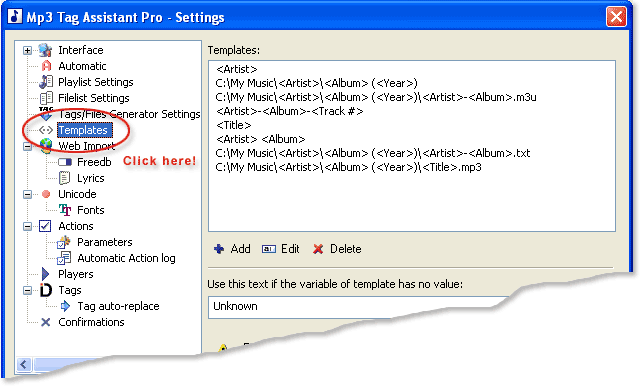
You can create some templates beforehand. For this, open a program Settings dialog and select "Templates" item (see Figure 1). Our programs are installed with several templates. You can use them as examples for creation of the new templates.
Using templates!
Figure 1. Settings dialog

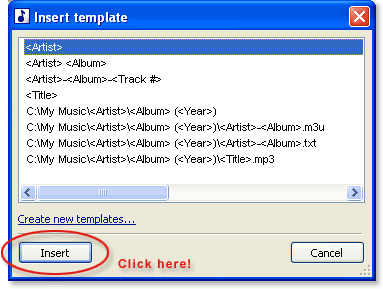
You can use the specified templates in different windows of the program. For this, press the 'Insert template' button (see Figure 2), the Insert template window will open (see Figure 3). Select template and click the 'Insert' button.

 You can double-click on template for insert this template also.

Using templates!
Figure 2. The 'Insert template' button

Using templates!
Figure 3. The Insert template window


See also


© March 18, 2007 by AssistantTools.com. All rights reserved.


Buy Mp3 Tag Assistant Professional now! MP3 tag editor, WMA metadata editor, M3U playlist generator with batch operation and UNICODE support.

Products


· Mp3 Tag Assistant Pro

Professional-level MP3 WMA M4A OGG FLAC APE TTA tag editor with UNICODE support, PLS/M3U playlist generator, XML/TXT/CSV filelist generator, web search for lyrics and album information.
Read more...


· Direct Audio Converter & CD Ripper

Simple-to-use converter that allows you to convert audio files between various audio formats and rip CD audio tracks directly to MP3, WMA, WAV, OGG, FLAC, Monkey's Audio APE or MusePack MPC, SPX, AIFF, AC3, AAC, MP4, M4A.
Read more...


· Abee MP3 Duplicates Finder

Specialized program for search of duplicates in MP3, WMA, OGG, AAC and MP4 audio files.
Read more...


· Music Tag Editor

Simple-to-use tag editor that allows you to change tagged information about your MP3/WMA music files. Quickly change music filenames, create PLS/M3U playlists and even add lyrics to your music files, with full UNICODE support.
Read more...


· Direct MIDI to MP3 Converter

Simple-to-use converter that allows you to easy convert MIDI and KARAOKE MIDI files to MP3 format.
Read more...


How to Use

· How can I edit MP3 tag?

· The advanced features for editing MP3 tags.

· How I can edit lyrics on my audio files?

· How I can edit artwork on my audio files?

· How I can synchronize ID3v1 or ID3v2 tags?

· How I can use tag filters?

· How I can use ANSI characters on audio tags?

· How I can use my national characters on audio tags (about UNICODE tags)?

· How can I change WMA metadata?

· How I can generate filename using tag information?

· How I can generate tag from filename?

· How I can generate tag from other tag?

· How can I search of lyrics for my audio files?

· How can I get tags from Internet?

· How can I create M3U playlist with my MP3 files?


All Tips


Articles

· A professional-level MP3 Tag Editor

· Automation of operations with your audio files using templates

· FreeDB support: receive tag information.

· M3U playlist format

· PLS playlist format

· Supported ID3v1 tags

· Supported ID3v2 tags


All Articles


AssistantTools.com In

German French Italian
Spanish Portuguese
Spanish Portuguese
Serviced by Google.com


Newsletter


  Home| Products| How to use tips| Downloads| Purchase| Support| Affiliate| Press| Articles| News feed| About Us| Our Partners| Useful links On Top  
Copyright © 2003-2008 by AssistantTools.com. All rights reserved.  Terms of Use| Privacy Policy| Site Map